
Improving User Experience with Performance Optimization
It sounds grand, but "performance optimization" is always a tricky topic.
Sure, it's something frontend developers should care about. But it can easily become a trap — chasing numbers when there are more important things to build.
"Do I really need to do this now?" I'd ask myself. "Is this really the priority right now?"
Because there are always more important things. Especially feature work. (Which, let's be honest, never ends.)
Performance Optimization: Is It Really Necessary Now?
Toss Campfire Video once had a discussion about performance optimization. To borrow Geonyeong's words:
"If you're thinking, 'Performance optimization might be nice?' — don't do it.
If you still feel like you should, think about it one more time.
If you really, really, really think you have to — then start with profiling."
I completely agreed. Performance optimization matters, of course.
But... if other features aren't built yet, or if users are struggling with something else entirely, getting swept up by a "feeling" that "I should optimize" can actually cloud your priorities.
Do it when it's truly needed. That's what I believe.
Why I Felt It Was Truly Needed
So with that standard in mind, why did I end up doing performance optimization?
Because I really, really, really thought it was necessary.
Jung Archive — while building the website, something kept bugging me from a user's perspective.
Certain pages were painfully slow to load. Slow enough that even I, the developer, noticed.
I had about 5 people around me do QA, and they all felt the same discomfort. The feedback was unanimous: "The site feels slow overall."
If users are noticing discomfort — even with a small group — isn't that exactly when performance optimization should be on the table?
There were multiple bottlenecks, but this time I'll focus only on page rendering performance.
Here's what was happening:
- On the blog page, users had to wait a noticeable amount of time before the first screen appeared.
- Clicking a category tab took about 2 seconds before content showed up.
- The gallery page had similar delays when switching tabs — images loaded slowly, giving a sluggish impression.
The core problem: the data needed for the screen wasn't being prepared in time, causing a perceptible delay for users.
Why Was It So Slow? The Real Reason
One might wonder, "Why wasn't it built statically from the beginning?"
Since blog content doesn't change frequently, it made sense to use Static Site Generation (SSG). And that's exactly how I had set it up. But at some point, things went sideways.
When I added multilingual support, all routes got ko and en language prefixes. This turned them into Dynamic Routes, which meant they were no longer statically cached.
Next.js stores the output of static routes (HTML and React Server Components Payload) in the Full Route Cache, serving them quickly on subsequent visits.
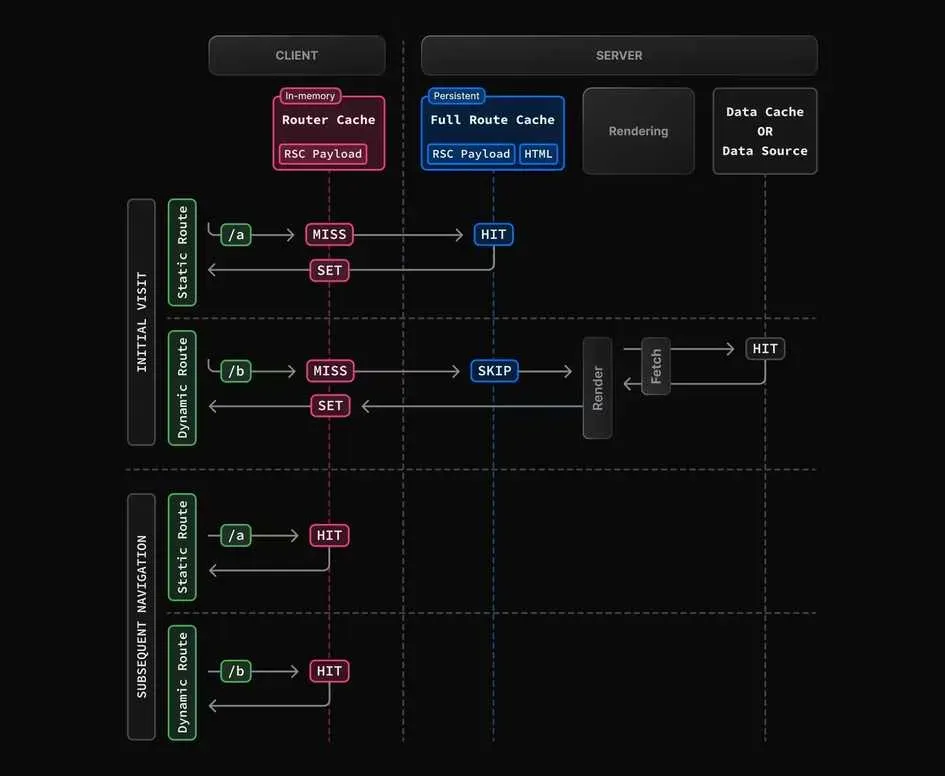
But dynamic routes don't get this cache treatment. The server had to re-render the page on every request — effectively operating like SSR. Each request meant rebuilding HTML from scratch, increasing TTFB (Time To First Byte) and making the site feel slow.
Honestly, this happened naturally. Adding i18n (currently just the setup) unintentionally turned static pages into dynamic ones, breaking the Full Route Cache.
On top of that, there was query parameter-based routing.
URLs like /blog?cat=dev or /gallery?tab=collections use searchParams, which Next.js treats as dynamic APIs — excluded from static cache. This triggers re-rendering on every request, making the Full Route Cache useless once again.
Now, dynamic rendering isn't inherently bad. Some pages genuinely need server-side HTML generation at request time — like personalized pages that also need SEO.
But for my blog, gallery, and Spot pages? The story was different. User interactions were limited to likes and comments at most — things easily handled on the client. There was no reason for the server to handle the initial page render. Making these pages dynamic only killed caching and slowed everything down.
Seeing the Numbers: Lighthouse Analysis
Time to face the music. I decided to get the report card I'd been deliberately ignoring.
Running Lighthouse made it painfully clear how bad the user experience actually was.
(All measurements were taken on deployed pages, incognito tab, desktop environment. Scores may vary slightly by network and device.)
Scores may vary slightly depending on network conditions and device performance.)
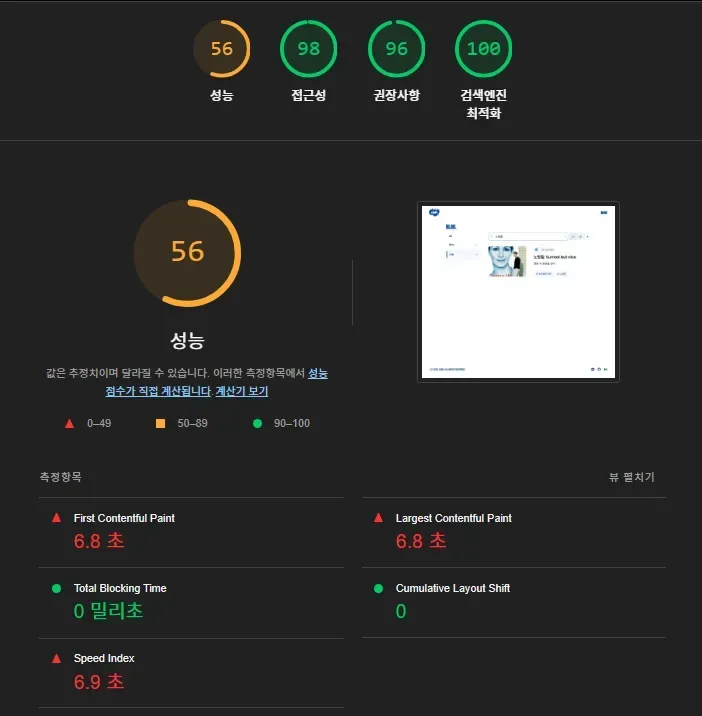
/blog page Lighthouse measurement
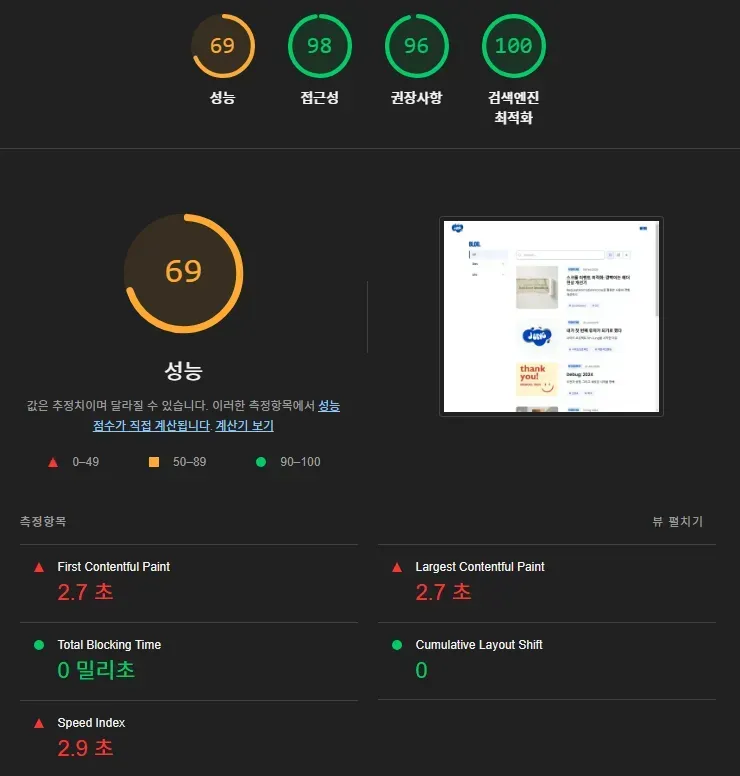
Looking at the numbers, you might think, "That's not so bad?" But by Web Vitals standards, it's quite slow.
FCP and LCP are the key metrics that determine perceived speed. Exceeding 1.8 seconds (FCP) and 2.5 seconds (LCP) essentially earns you a "slow" label.

Both of my pages exceeded those thresholds. From a user's perspective: "The page loaded, but... nothing's showing up?"
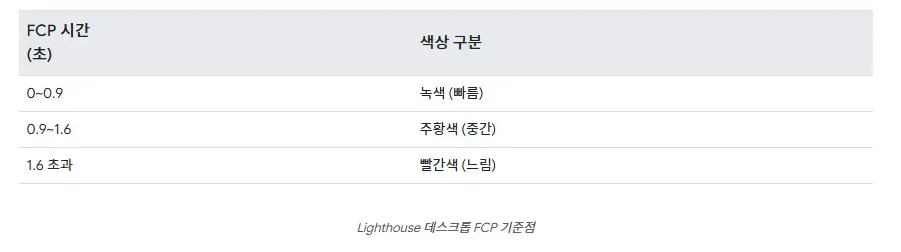
Comparing my scores against Web Vitals benchmarks — extremely slow by desktop standards.

1.8s FCP, 2.5s LCP — values that blow past every benchmark, landing squarely in "Poor" territory.
It finally hit me how much I'd been hurting the user experience.
For more on FCP, LCP, and Speed Index:
https://developer.chrome.com/docs/lighthouse/performance/speed-index
/blog?cat=UK Lighthouse measurement
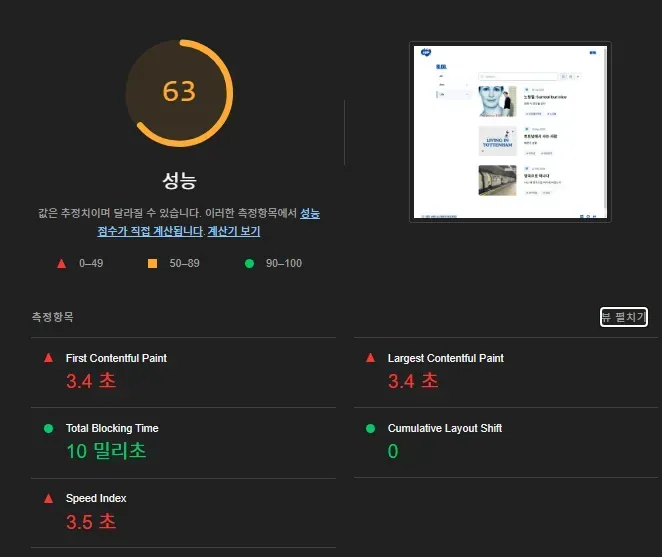
Similarly poor metrics.
/blog?cat=life&q=Notting+Hill — dynamic page with search results
A dynamic page with both category and search query requires more computation at render time, so performance metrics can be even worse.
/gallery page — same story.
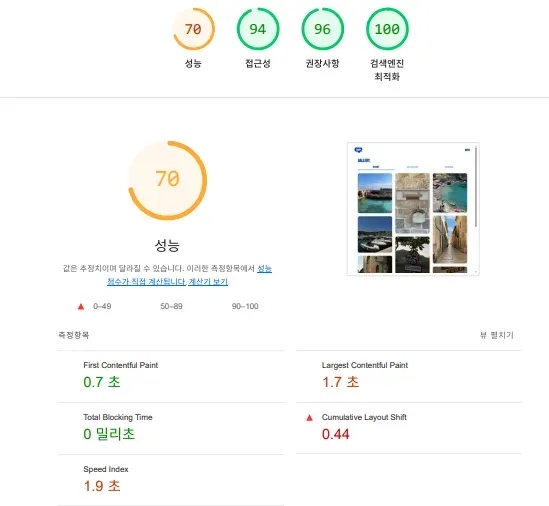
Problem Identified. Time to Fix It.
The problem was clear. The direction was set.
Use Next.js caching properly.
For pages where possible, generate them statically and serve them pre-built.
For everything else, fetch data asynchronously on the client.
With that as my guide, I categorized pages:
- Which pages can be statically pre-rendered (SSG)?
- Which data still needs to be fetched per request (CSR)?
- How can I convert dynamic pages back to static ones?
While working through this, I stumbled on a Kakao Tech Blog post where they'd hit the exact same problem and solved it.
It was a pattern applied at a major company, with measured performance metrics and numerical results — highly credible.
For side projects that lack user metrics, real-world case studies from major tech blogs are invaluable references. (Nothing beats a case proven with actual numbers.)
Here's the approach I took:
- Pre-generate all multilingual paths, converting blog pages back to SSG.
- Convert query parameter routes to static paths:
blog?cat=dev→blog/cat/dev. Same treatment for/spotpages. - Gallery tab switching too:
gallery?tab=collections→gallery/collection— pre-rendering all tabs.
Fun fact — Instagram uses the same pattern. When switching tabs, URLs are clearly separated:
(username)/reels, (username)/saved, (username)/tagged

Structuring paths statically enables proper use of Next.js's Full Route Cache.
All pages are pre-generated at build time, so when a user requests a page, HTML is delivered instantly — no processing needed. This directly improves LCP and FCP.
After switching to static pages, these metrics improved dramatically. With first-screen content rendering quickly, the perceived speed difference was night and day.
Multilingual paths work the same way.
Using generateStaticParams() to pre-generate ko and en paths:
export async function generateStaticParams() {
  return SUPPORTED_LANGS.map((lang) => ({ lang }));
}
Currently only en and ko are supported. This structure pre-builds all possible pages at build time, serving cached HTML without any server rendering cost.
The old blog?cat=[categoryName] searchParams structure was converted to a static blog/categories/[categoryName] path.
blog/categories/[categoryName] static path structure.

Same approach — generateStaticParams handles it.
Changes Verified by Numbers
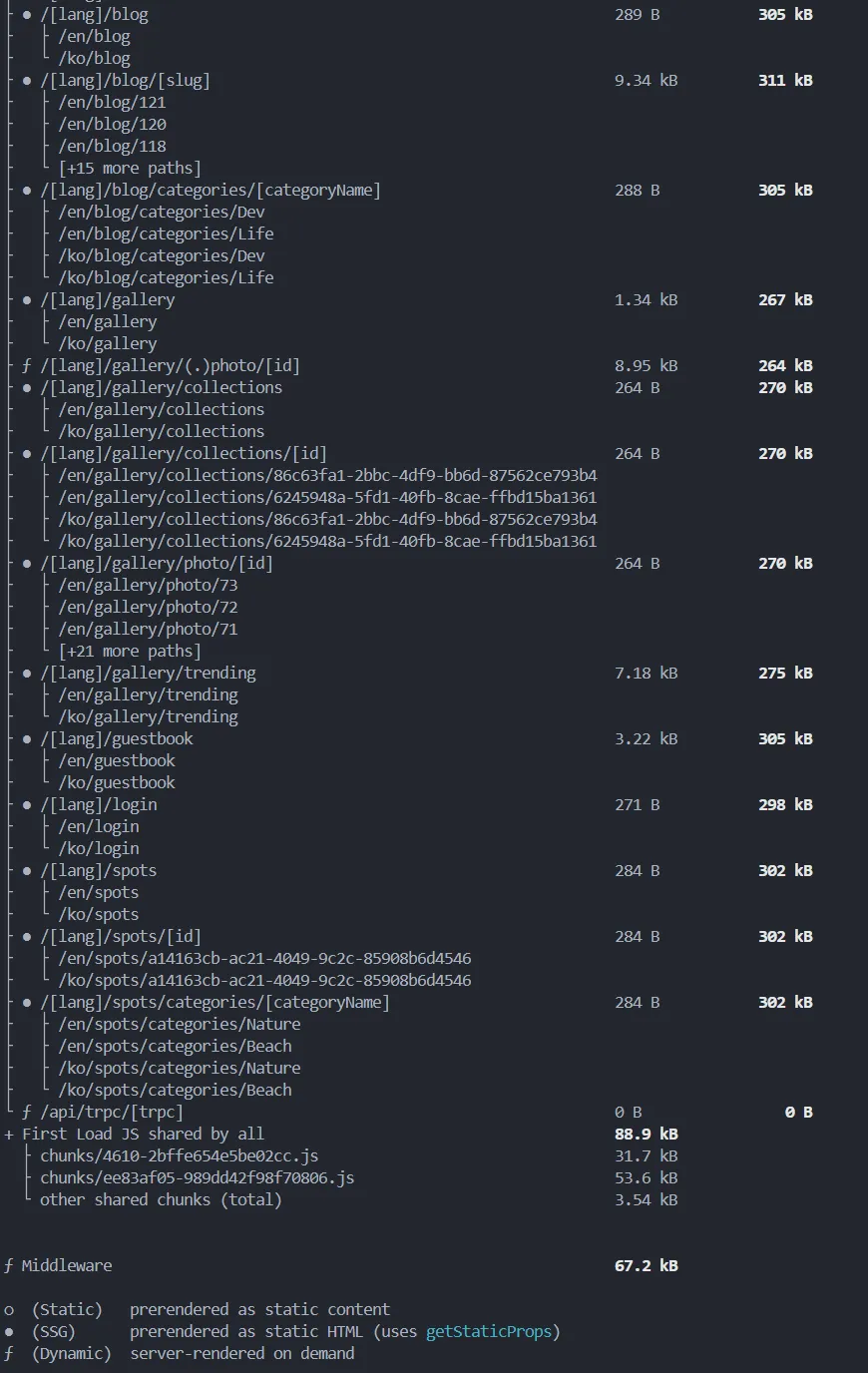
The build output confirms that all language paths (/en, /ko) and individual pages are properly generated as static routes. Blog, gallery, and spots pages are pre-rendered per language. Even detail pages like gallery/collections/[id] and spots/[id] are included as static pages.
Pre-generating at build time means no server-side rendering on page requests, and Full Route Cache works as intended.
After applying these changes, I measured again.
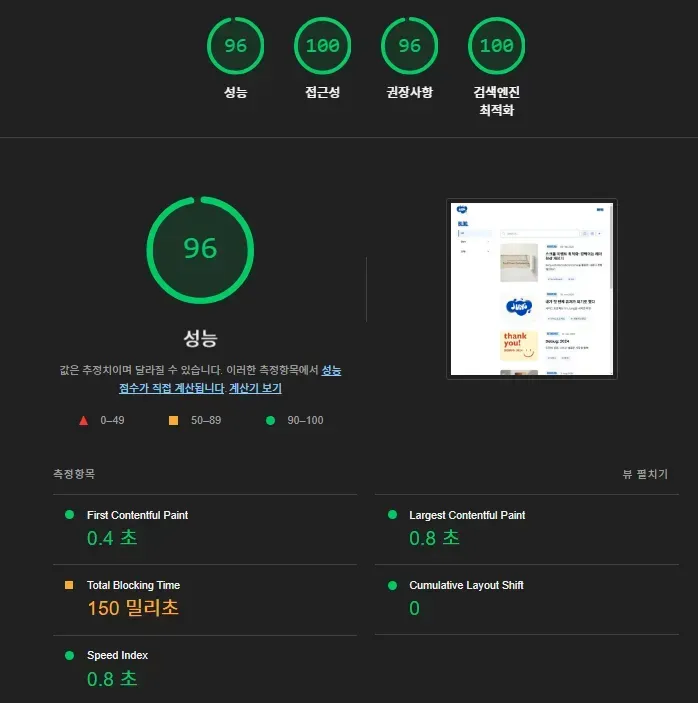
/blog/categories/frontend — category page measurement
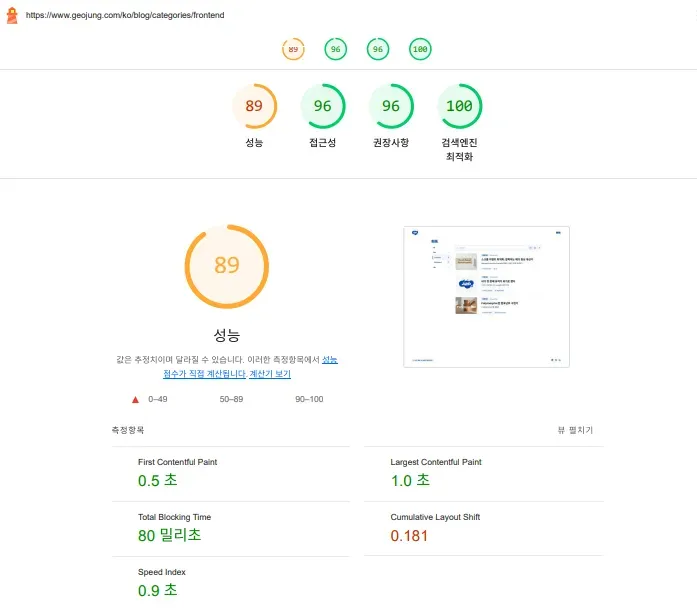
There's still some layout shift, but FCP and LCP have improved massively.
/gallery page — same improvement.
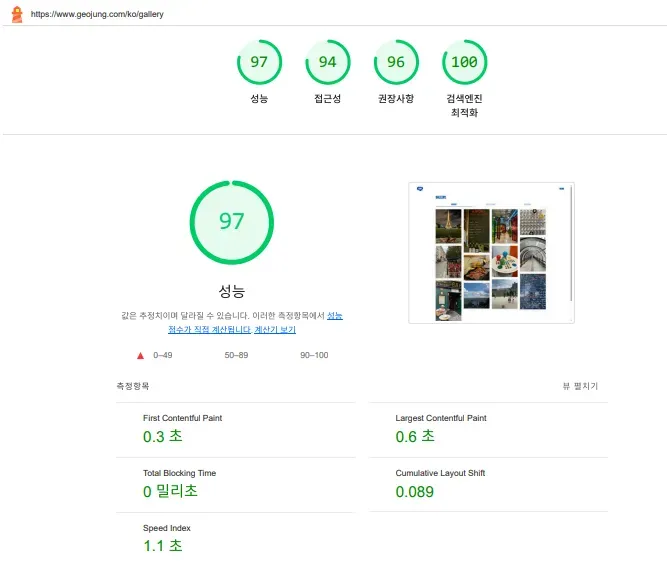
/gallery/photo/[id] — detail page
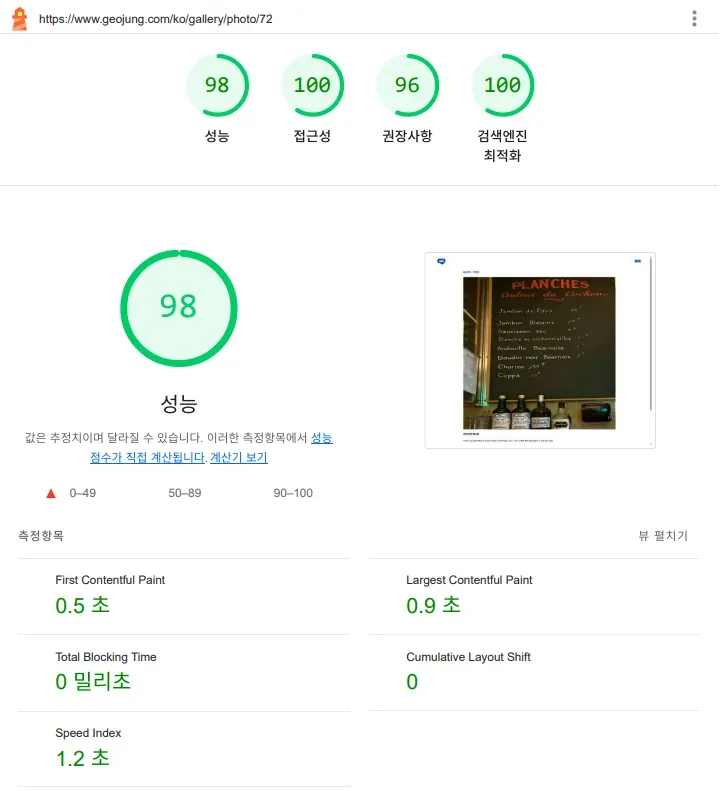
Across the board, FCP and LCP improved significantly, and Speed Index dropped noticeably.
Users can now feel pages rendering faster and smoother.
Feedback from people around me confirmed it — user experience improved dramatically.
Does Going Static Solve Everything?
Here's the natural follow-up question.
"Why not just make every page static and pre-render everything at build time?"
Add Full Route Cache on top, and you'd think it's perfect.
But reality isn't that simple. There are clear trade-offs.
For pages with few changes and little user interaction, SSG is obviously the way to go. Served instantly from a CDN — fast and cheap.
But for pages with frequently changing data or user-specific content, going static could actually backfire.
Plus, with Next.js's shift to App Router, the old getStaticProps page-level rendering decisions have evolved into React Server Component-based, component-level configuration.
https://vercel.com/blog/understanding-react-server-components


So in my case: blog, gallery, Spot — content that rarely changes — SSG.
For interactive features within pages (likes, comments) — async client-side fetching.
For example, likes and comments are fetched asynchronously on the client.
For content that's mostly fixed but needs periodic updates — ISR (Incremental Static Regeneration).
For example, pages like the Guestbook page,
- real-time data,
- user-specific content,
- and SEO requirements — then SSR might be the right call.
As Data Grows, Static-Only Has Its Limits
Right now, all gallery and blog detail pages are pre-generated statically.
But what happens when data grows to 1,000 or 2,000 items?
And with multilingual support requiring pages per language — ko, en?
Simple math: 2,000 items × 2 languages = 4,000 pages.
Generating all of that at build time would take ages.
That's not the direction I want.
The data is small for now, but as content grows, build time will inevitably become an issue. When that happens, I might use metrics like view count or likes to statically pre-generate only popular content, while using ISR or SSR for the rest.
"When should this page be displayed, with what data, and how?" Pick the right strategy — SSR, SSG, ISR, or CSR — for each situation. There's no single right answer. What matters is choosing what fits your project.
What I Took Away from This
This optimization happened at a point where I genuinely felt, "It's time." And seeing the actual improvement in user experience was deeply satisfying.
Here's the thing I didn't expect: what I thought was just performance optimization turned into a deeper exploration of rendering strategies. "Which page should be served how?" Setting that standard matters more than I'd realized.
Once the sword of performance optimization is drawn, I'm seeing it through. The score isn't 100 yet — CLS and render-blocking resource issues remain. I'll cover those next.
Stay tuned for part two 🙇