
I applied to Dale Study's AI study group after hearing that they were recruiting participants. We chose the official Claude Code documentation as our reading material and decided to follow the learning order recommended in the docs.
I had already been using Claude Code a lot. I used it at work and relied on it actively when building personal projects. But using something often and using it with a solid understanding were not quite the same.
Why does it work this way? Is my current setup helping me? Is there a better way to use it? Even though I used it comfortably, there were quite a few things I could not explain. I wanted to open up those black boxes little by little.
I was also curious about how other developers used it. What did they delegate at other companies? How did they use it in personal projects? How did each person build their own harness? It was valuable to be able to share those stories instead of reading the docs alone.
Looking Inside a Familiar Tool
The first document explained Claude Code by separating the model from the harness. The model makes decisions, while the harness handles tool execution and context management. Work continues by gathering the information needed, taking action, and checking the result. How Claude Code works
Reading the behavior I was used to in terms of names and structure helped me understand it more clearly. I realized that reading files, running commands, and organizing the conversation when it gets long are all part of one workflow.
When an answer is not good enough, it is easy to start looking for a better model or prompt. From now on, I also want to ask whether I clearly explained what information I provided, which tools were available, and what I would consider complete.
The official guide also recommends giving Claude a way to check its work. For a test, that means specifying the expected result. For a UI change, it means explaining which screen and behavior to check. I want to go beyond a reply saying “fixed” and look at how the work was checked and what happened. A passing test and the behavior I actually wanted are also two things I need to check separately. Ways to verify the work
Questions About Subagents
While reading the docs, I learned for the first time that subagents can also help manage context. I had not used them much before, and I wondered whether delegating work would produce lower-quality results than doing it in the main agent.
I wrote about this thought in an earlier post, “Are Subagents Smarter?”.
The general subagents described in the current docs work in a separate context. fork, however, starts by copying the existing conversation. In both cases, files read and tool output produced during the delegated work do not pile up directly in the main conversation; a summary comes back instead. Subagents and context
I came away thinking that the important question is not whether a subagent automatically produces a better answer, but what I asked it to do and how well I communicated the necessary context. I need to be clear about the goal, the scope to check, the materials needed, and the result I want back.
I also needed to look at the performance figures more precisely. Anthropic explains that a combination of an Opus 4 lead agent and Sonnet 4 subagents scored 90.2% higher than a single Opus 4 on an internal research evaluation. That does not mean coding in general becomes 90.2% better. The roughly 15x token usage was also a comparison with general chat. Anthropic's multi-agent research example
For work with a lot of shared context and frequent back-and-forth decisions, I will keep working in the main agent. For research that can be split into clear parts, or work where I only need a finished result, I will try delegating it. I will have to discover the right boundary through practice.
350 Skills vs. the 50 I Use Often
Reading about extensions made me look back at my own setup. I had installed around 350 skills at the time, but I seemed to use only about 50 of them regularly. I kept installing things because they sounded useful, and never properly organized what had accumulated.
The same was true of hooks, MCP, CLAUDE.md, and rules. I found old settings that were still around, along with instructions so strict that they sometimes got in the way of the work.
The official docs recommend starting with project instructions and adding extensions when a specific need arises. Skills do not always load their entire contents; after reading a description, Claude loads the body of the skill it needs. Extend Claude Code
I realized that knowing what I have and when to use it matters more than the number of things installed. I should refine the skills I use often and revisit instructions that do not fit the work in front of me.
In a comment, I wrote that a personal harness probably needs regular maintenance, like a household. That description still feels right. A setup is not finished just because it was created once.
While writing this post, I also looked through the release notes. On September 26, Claude Code added /doctor prompt-audit to check CLAUDE.md files, skills, and agent configuration written for older models. I should revisit whether the instructions I have collected are still needed for the model I use now. Before adding another recommended setup, I want to look at what I use often and reconsider rules whose purpose I find hard to explain. v2.1.283 release

Reading the docs made me revisit my own setup. My original Korean comment on GitHub. dgd03146 · August 15, 2026.
Context and Cache Are Different Things
I liked that the context documentation showed visually how a conversation gets filled. I used to worry even when usage was only around 30–40%, but these days I focus more on the goal and look at the number less. That made me curious about when other people summarize a conversation, open a new session, or use a subagent.
The docs describe summarizing between tasks, starting a new conversation when beginning unrelated work, and delegating large reading tasks. For me, thinking about what needs to remain for the next task seems more useful than choosing one particular percentage. Explore the context window
This was also the first time I properly read about prompt caching. It reuses the same input that has already been processed to reduce cost and latency; it does not reduce the amount of context space occupied by the conversation. Changing the model changes the cache as well. The effect of changing effort can vary depending on the model and how it is provided. Prompt caching
Once I understood this, I stopped thinking only about saving as much as possible. I could instead understand why a setting I changed affected the next response. I want to choose a model that fits the work at the start, then summarize as much as needed at the boundaries of the task.
A question I left about context · A comment I left after reading about caching
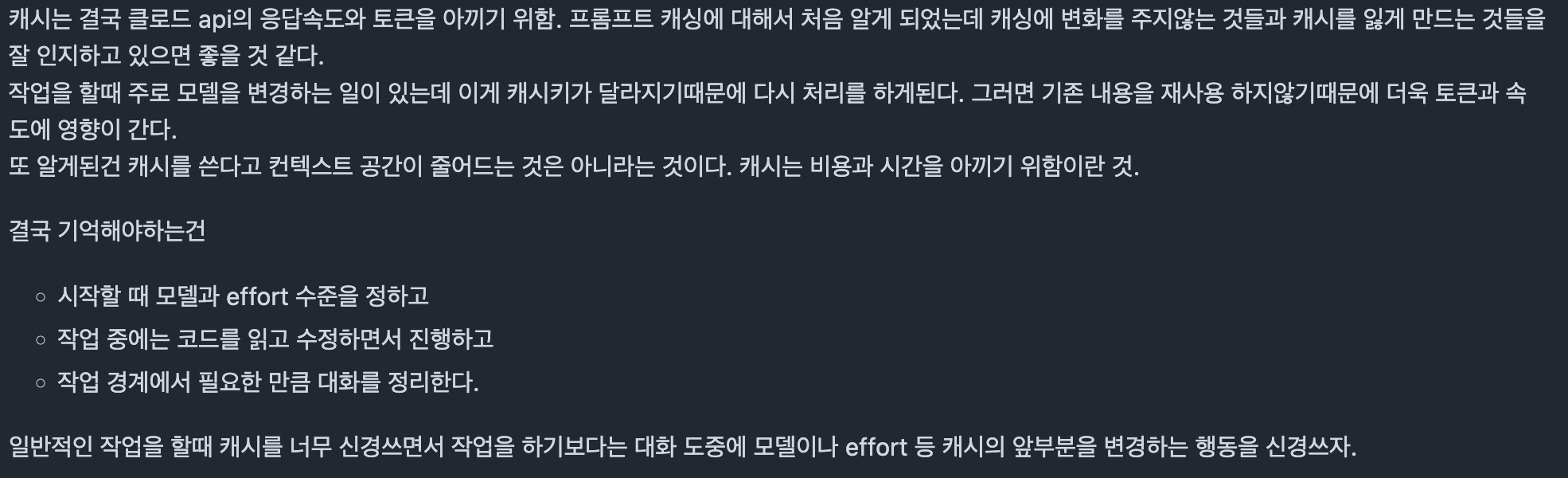
My original Korean notes on prompt caching. The article adds the current model- and provider-dependent effort exceptions. My original comment. dgd03146 · September 5, 2026.
Memory Needed Cleanup Too
CLAUDE.md and rules were things I had been using without properly understanding the difference. Both are places to leave instructions, but rules can be organized by topic or applied only to a particular path. Automatic memory is different: it is closer to a notebook where Claude stores what it learned and the patterns it found. Memory
There were many things I had asked Claude to remember, including information that was no longer current or did not really need to be kept. Having a lot of memories did not mean they were being managed well.
At first, I thought these settings were ultimately just a way to save tokens. I also wondered whether management would become unnecessary if the context became large enough. Now I think that even a larger space does not automatically clean up old instructions or rules that conflict with one another.
The final section, Common Workflows, contained a lot I already knew, so I read it almost as a review. Even so, it gave me a chance to check the work I had become accustomed to doing. As models improve, the range of work I can delegate autonomously has expanded, but I still need to explain the result I want and the actions I do not want delegated.
Conversations That Lasted Longer Than the Docs
I learned a lot from the official documentation, but what I especially enjoyed about the study was hearing how each person used Claude Code.
Even when we read the same topic, one person had applied it at work while another used it differently in a personal project. People also introduced related trends and things they had tried themselves and found useful. I could hear how features described in the docs were actually used in real work.
soobing said that building a small version of Claude Code helped them understand how the harness works. It made me think that building one myself could answer some of the questions I still had after reading the docs. soobing's notes
choihooo emphasized explaining the goal, what can change, what must stay the same, and what counts as done, rather than prescribing every step. Letting AI work independently does not mean handing it a task without any conditions. It made me look back at how clearly I had been explaining the results I wanted. choihooo's notes
We also shared experiences from our own work on Discord. salt said that during a work session, Claude often asked whether to save something to memory. Hearing about that experience connected the memory documentation to how someone actually used it.

salt's experience with memory during work, shared in the study chat. The original message is in Korean. Original Discord message · September 12, 2026.
When a Korean prose-editing tool was shared, salt mentioned using it while preparing presentation scripts. I enjoyed hearing how people applied these tools not only to coding, but also to writing and preparing talks.

After a Korean prose-editing tool was shared, salt mentioned using it for presentation scripts. The original message is in Korean. Original Discord message · September 19, 2026.
Because our companies, responsibilities, and experience levels were different, we also paid attention to different things. Listening to developers with more experience made me think about what I should not overlook while using AI so extensively.
If I had read alone, I might have understood some things and moved on. Hearing someone else explain them and applying them to my own workflow made me ask new questions. That was a meaningful source of motivation for me.
Saturday at 9 a.m.
Meeting every Saturday at 9 a.m. was not easy. Still, reading and talking together at a set time gave me a reason to keep studying. After getting up, attending the study session, and starting the day, the weekend felt a little longer.
I did not attend every session. I tried to participate as much as my schedule allowed, and I learned something each time I joined. If another AI study group opens in the future, I would like to take part again.
What I Want to Try After the Study
While finishing this post, I also looked at recent examples of how people use Claude Code. On Reddit, kenthesaint described running a formatter and type checker after edits so they did not have to relay each error manually. In the same discussion, wallabee_kingpin_ suggested putting those checks before commits so that human contributors would face the same requirements. What caught my attention was not another tool to install, but where to keep checks that need to happen repeatedly. I want to start with the checks already used in my project and confirm that they actually ran after AI worked on the code. kenthesaint's experience · wallabee_kingpin_'s suggestion
Going forward, I want to study how agents work and eventually build a small agent myself. I think I may be able to answer some of the questions I had while using these tools by trying to implement them.
I also want to revisit my workflow, starting with one small task. I could record what I expected, which context I provided, and how I checked the result. When the result is not what I wanted, I want to look at whether information or a useful check was missing before simply asking Claude to try again.
That does not mean I need a long plan for every task. The official guide suggests handling small, clearly scoped changes directly and planning when the approach is uncertain or the change spans multiple files. I want to start by asking what still needs a decision. Guidance on exploration and planning
Even so, I do not want to mistake using AI a lot for studying. I want to keep separating what I understand from what I still cannot explain, and continue making time to verify the necessary parts myself.
Thank you to Evan, who organized the study, and to everyone who read and discussed the material with me.
Documents We Read and Records We Left Together
- How Claude Code works: Official documentation · My comment
- Extend Claude Code: Official documentation · My comment
- Explore the context window: Official documentation · My comment
- Prompt caching: Official documentation · My comment
- Memory: Official documentation · My comment
- Common workflows: Official documentation · My comment
I checked the official documentation and recent release notes again on October 10, 2026. Dates in this post use Korea Standard Time. The linked comments and earlier post reflect what I recorded when I first read them; this post also includes exceptions and comparison scopes I verified afterward. I have not treated every recommendation in the current guide as a new practice introduced this month.